LAST WAR // ALLIANCE + SERVER TRACKER

Last War Alliance Tracker
and Server Tracker.
Built for officers.

Upload screenshots, let AI do the work. Monitor VS points, donations, and storm participation. Track your alliance or entire server - more features coming soon!

4.3 / 5
Start Free TrialSee How It Works
7-day free trial. No credit card required.
// INPUT
Screenshots
Up to 25 per upload
// INPUT
Video
Scroll-record. Done.
// OUTPUT
Your dashboard
Ready in seconds
farmops.app / alliance / overviewUTC --:--:--
MEMBERS
100
+3 wk
POWER
16.4B
avg 164M
KILLS
9.4B
+1.2%
EVENTS
3
active
WEEK 47 // TARGETS
VS Duels
87%
Donations
72%
Storms
94%
ROSTER // TOP & BOTTOM100 MEMBERS
01DragonSlayer412M142R4
02ShadowKnight388M138R4
03ThunderStrike356M135R4
04PhoenixRise289M121
05IronWolf264M118
06BlazeKing241M104
07FrostQueen198M45
08NightBlade176M38
ALERT
FrostQueen · missed Canyon Storm · 2m ago
NightBlade · below VS threshold · 4m ago
PhoenixRise · joined alliance · 7m ago
StormRider · no donation × 3d · 11m ago
LIVE DEMO ALLIANCE

Click around
the real thing.

Don't take our word for it. Open the demo alliance and poke through the actual product — every dashboard, every chart, every export. No signup. No sales call.

AI SCREENSHOT PARSING//VS POINT TRACKING//DONATION MONITORING//CANYON STORM//DESERT STORM//HIVE PLANNER//SERVER RANKINGS//TRAIN MANAGEMENT//VACATION TRACKING//PERFORMANCE RANKINGS//CUSTOM EVENTS//ALLIANCE SEASONS//PUBLIC STATS PAGE//SHIELD MISS//VIDEO UPLOAD//CSV EXPORT//ALLIANCE NOTES//BULK INVITES//UNDO IMPORTS//REST API//WEEK COMPARISON//HIST POWER IMPORT//QUICK SUPPORT//
/ 01Last War alliance tracker

Everything You Need to Lead
One command deck.

Powerful tools designed for Last War alliance and server management.

// CORE

Screenshot Upload

Simply upload your game screenshots. Our AI extracts all the data automatically.

SCREENSHOT.PNG
DragonSlayer 412M 142
ShadowKnight 388M 138
ThunderStrike 356M 135
PhoenixRise 289M 121
IronWolf 264M 118
PARSED // 5 ROWS
PLAYERPWRVS
DragonSlayer412M142
ShadowKnight388M138
ThunderStrike356M135
PhoenixRise289M121
IronWolf264M118
// SERVER TRACKER

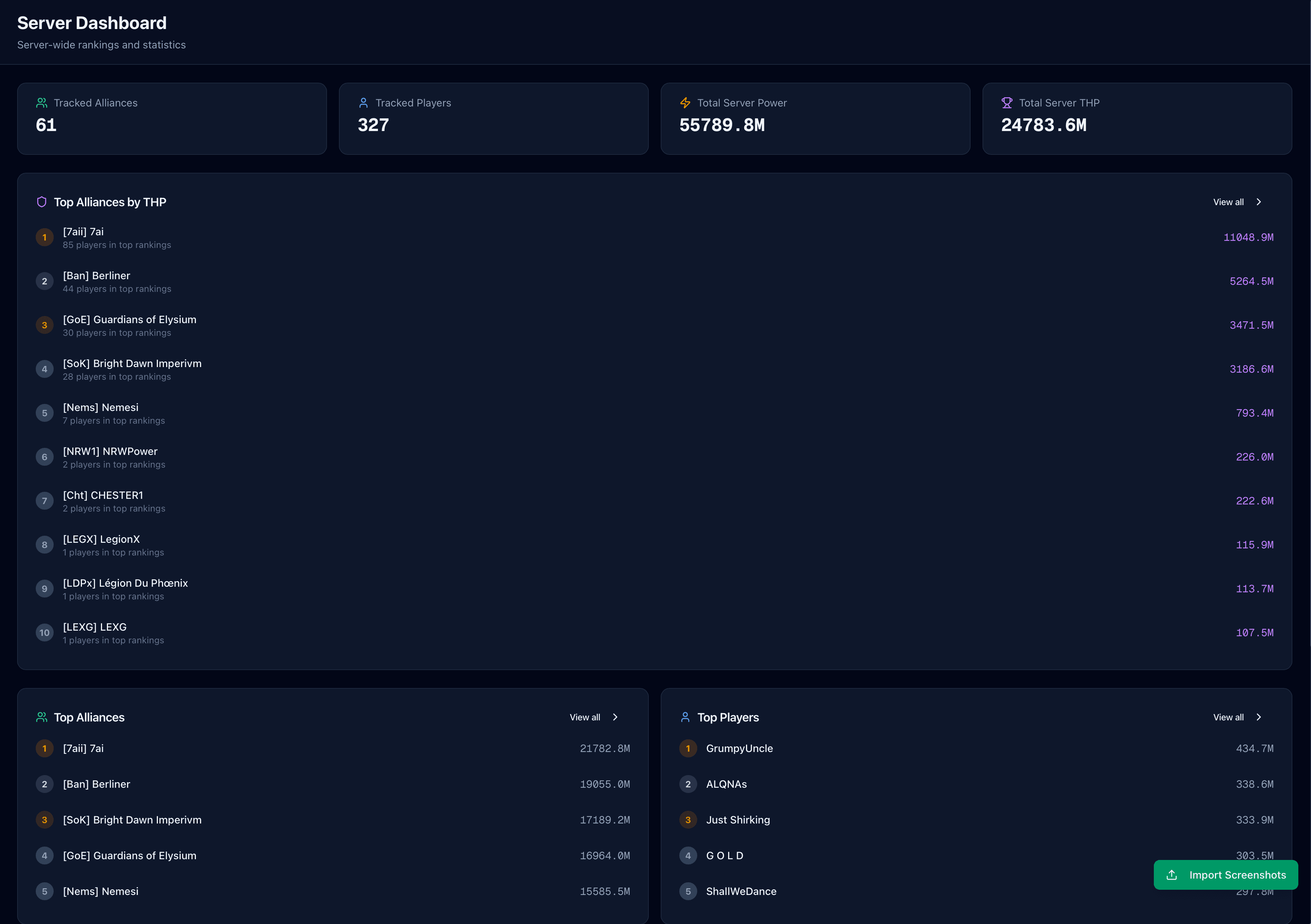
Server Tracking

Track alliances and players across your entire server. Monitor power rankings, kills, and server-wide events.

#ALLIANCEPOWERKILLS
1Crimson Lords
412M
38M
2Iron Phalanx
389M
31M
3Stormborn
356M
28M
4Apex Reign
312M
22M
5Black Sun
287M
19M
6Void Legion
264M
17M
// VS

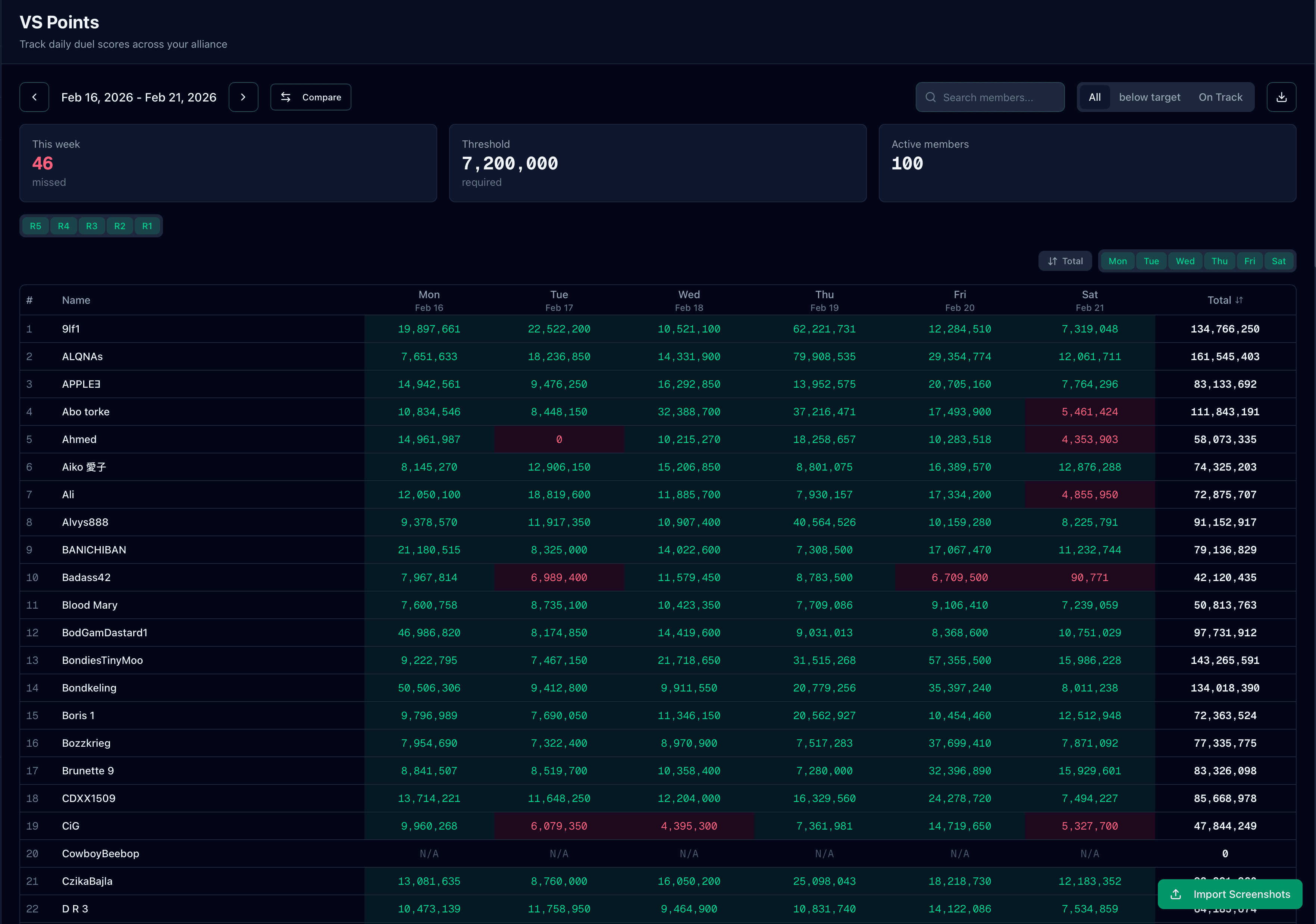
VS Point Tracking

Track daily duel scores across your alliance. See who's hitting targets.

// $$$

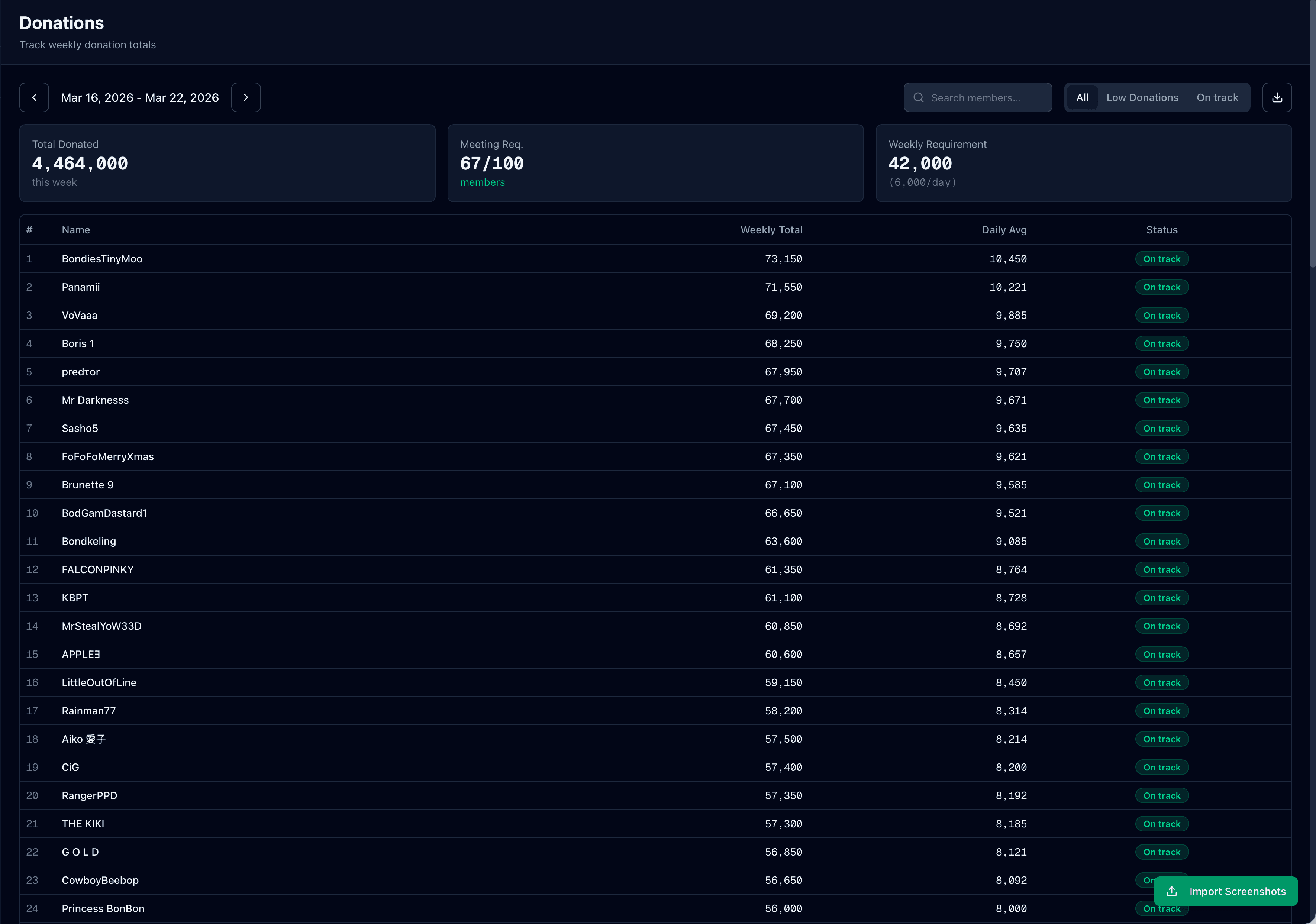
Donation Monitoring

Weekly donation tracking with configurable thresholds. Never miss a low donor.

M
T
W
T
F
S
S
// STORM

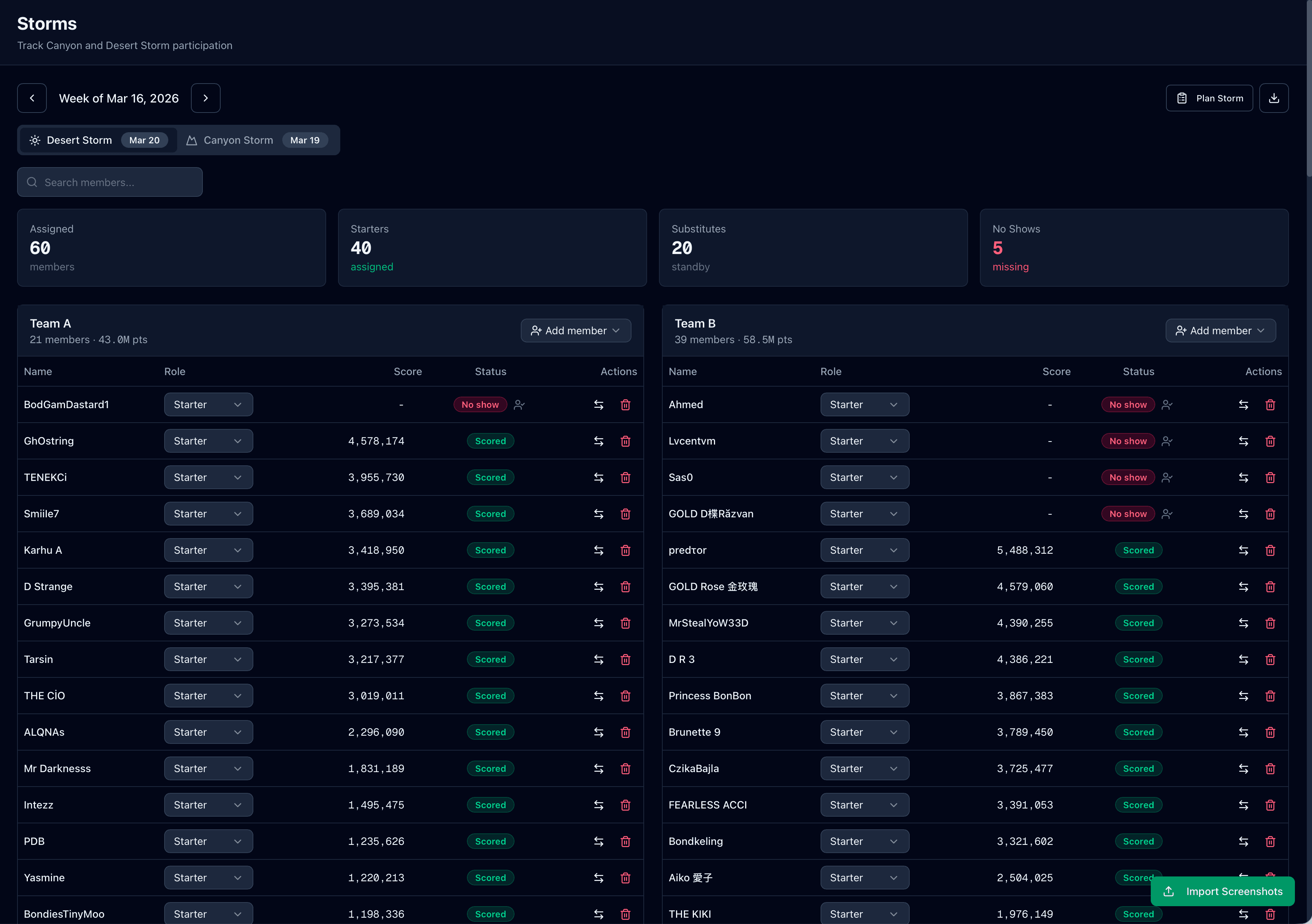
Storm Participation

Track Canyon and Desert Storm assignments, scores, and no-shows.

×
×
// HIVE

Hive planner

Map positions on 5×5 or 9×9 grids. Furnace center, inner ring, mining.

// TRAIN

Train Management

Automated train scheduling with fair rotation. Assign conductors and defenders effortlessly.

DAYCONDUCTORDEFENDERS
MONDragonSlayerBlazeKing · IronWolf
TUEPhoenixRiseShadowKnight · NightBlade
WEDThunderStrikeFrostQueen · BlazeKing
// EVENTS

Custom Events

THP, Zombie Siege, Marshall Guard, arena, warzone — track any in-game stat. Cumulative trackers and auto-generated graphs included.

THP · S3ZOMBIE SIEGE · WK 4MARSHALL GUARD · LIVEARENA · WK 12WARZONE · S2
CUMULATIVE+94 / W12
// SCORE

Performance Rankings

Automatic member scoring based on duels, donations, and storm participation. Customizable weights for your priorities.

DragonSlayer
98
ShadowKnight
94
PhoenixRise
81
FrostQueen
42
// LEAVE

Vacation & Break Tracking

Mark members as excused or left so real-life breaks stay fair. Missed events are still tracked, but planned absences do not punish reliable players.

BlazeKingEXCUSED · 3d left
FrostQueenBREAK · returns Fri
NightBladeACTIVE
StormRiderLEFT · former
// PUBLIC

Public Stats Page

Share your alliance stats with a custom subdomain. Great for recruitment.

https://stormborn.lastwar.farm
RECRUITING
100
MEMBERS
16.4B
POWER
94%
STORMS
// ROSTER

Member Profiles

Individual player dashboards with complete history, performance charts, and trends.

82SCORE
PhoenixRiseR4
289M PWR · S3 W4 · 4 events
Duels
92
Donations
78
Storms
88
Train
64
// API

Public REST API

API access requires the Auto Sync add-on: pull alliance data, push imports, and automate your workflows with documented OpenAPI and alliance-scoped keys.

$ curl /v1/alliance
{ "name": "Stormborn",
"members": 100,
"power": 16.4e9,
"vs_week": 4.8e9,
"updated": "2026-05-11"
}
// COMING SOON

More Coming Soon

We're constantly adding new features. Hero tracking, battle reports, and more are on the way!

/ 02Hive Planner

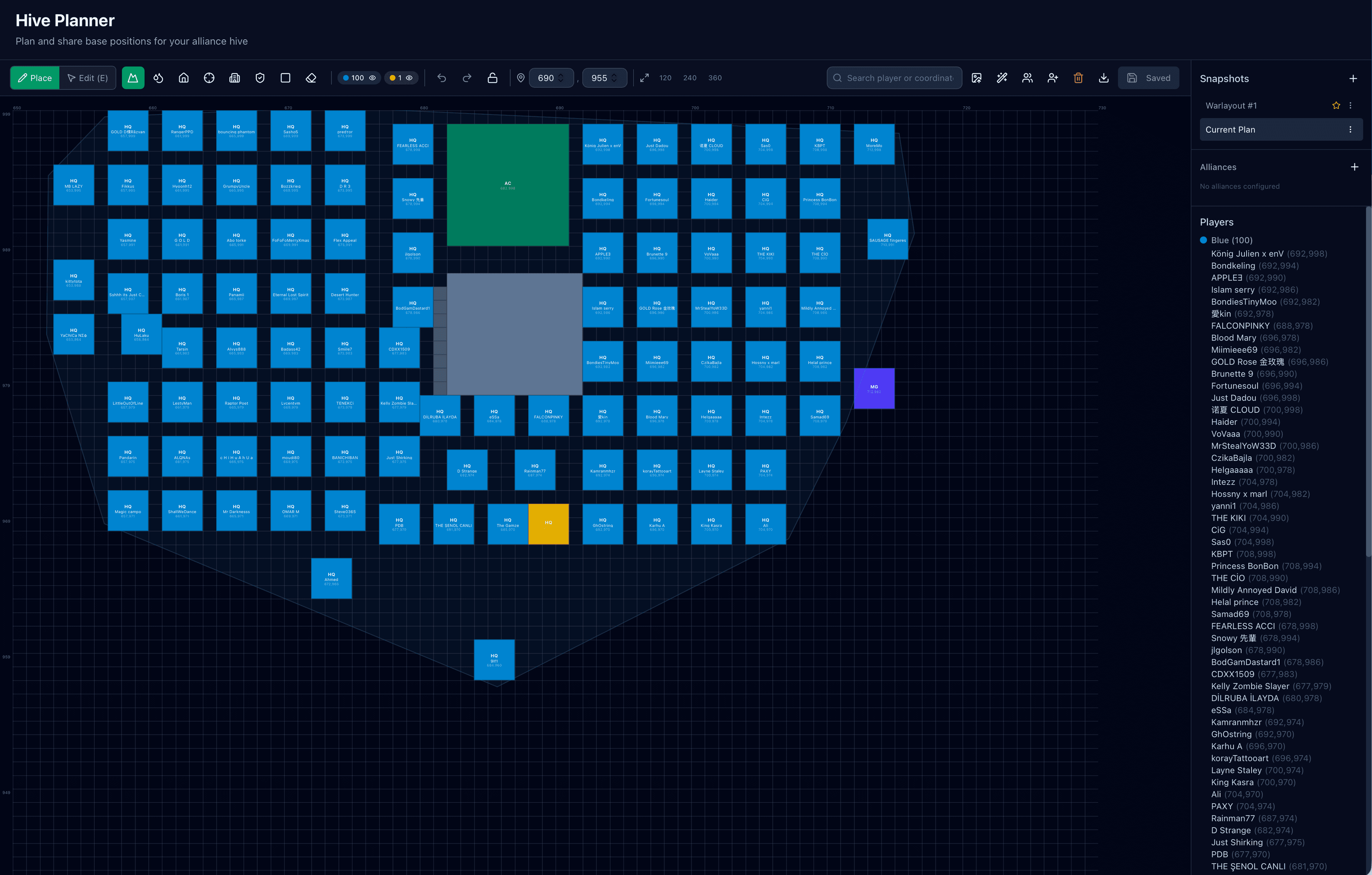
Hive planning before the strike.

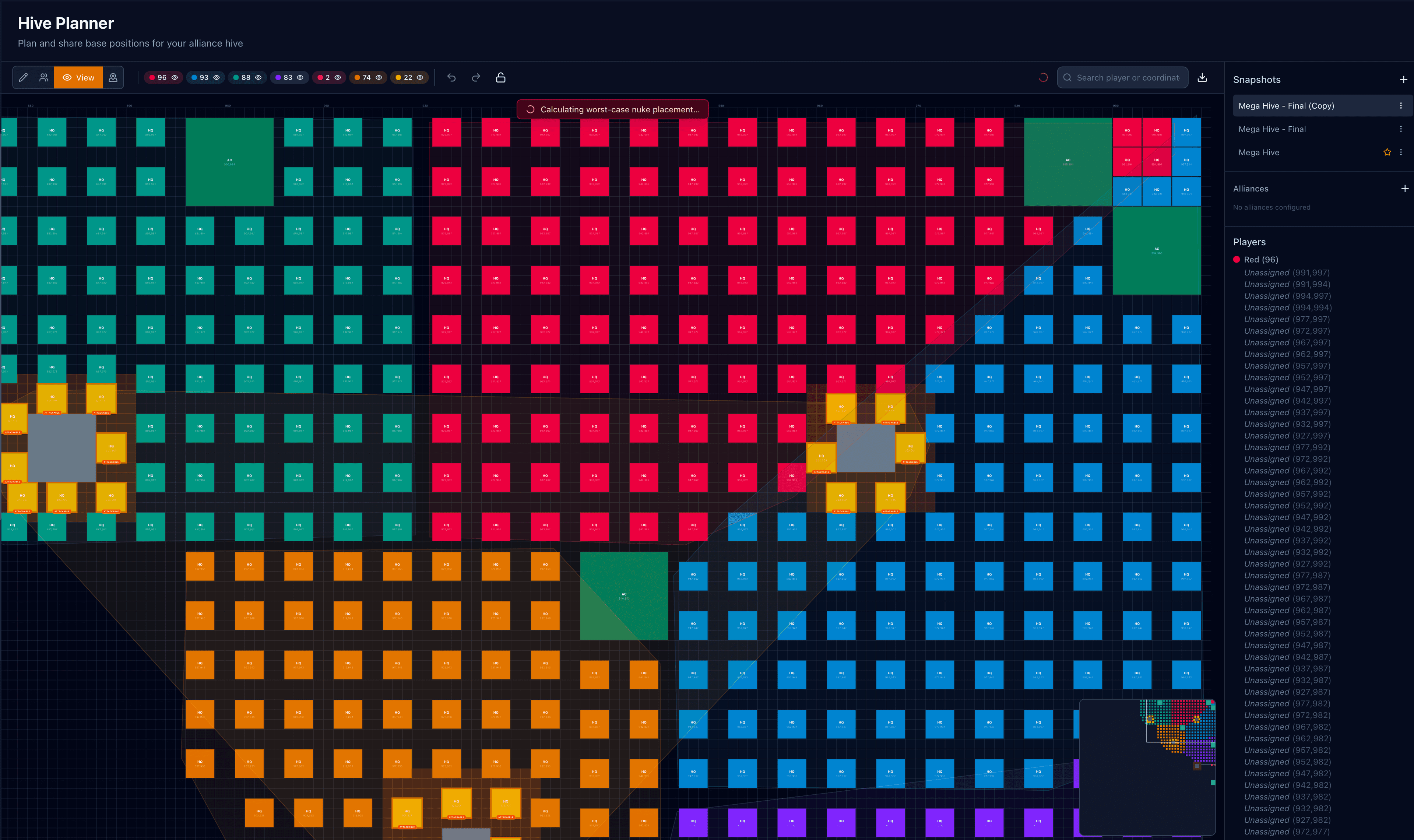
A dedicated Last War hive planner for base placement, mega-hive coordination, missile threat simulation, and saved layouts. Stop sending marked-up screenshots in chat.

// MEGA HIVE · 6 ACsSNAPSHOT 04 · 2026-05-11
ALLY 01
ALLY 02
ALLY 03
ALLY 04
ALLY 05
ALLY 06
INCOMING NUKE
/ 01

Alliance & mega hive

Plan one alliance or coordinate several in a shared, color-coded layout. Officers from different alliances see the same plan.

/ 02

Missile threat simulation

Compute the worst-case nuke placement and see exactly which bases sit in the blast. Stress-test before reset — not after the strike.

/ 03

Snapshots & versioning

Save the layout before every change. Compare side-by-side. Revert with one click if a new arrangement doesn't work.

/ 04

Coordinate & player search

Find any member by name or coordinate before assigning a slot. Essential once the hive starts filling.

/ 05

Image exports

Export the whole alliance layout — or any single player's slot — as a sharable image. Drop it in chat, no screenshots required.

/ 06

Officer handoffs

Latest snapshot is shared. One officer can pick up where another left off without rebuilding the map from memory.

/ 03Server Tracker

The whole server.
Not just your alliance.

A dedicated Last War server tracker. Watch rival growth, identify dangerous rosters, and see how your whole season stacks across all 8 servers — before the next conflict starts.

/ 01

Alliance & player rankings

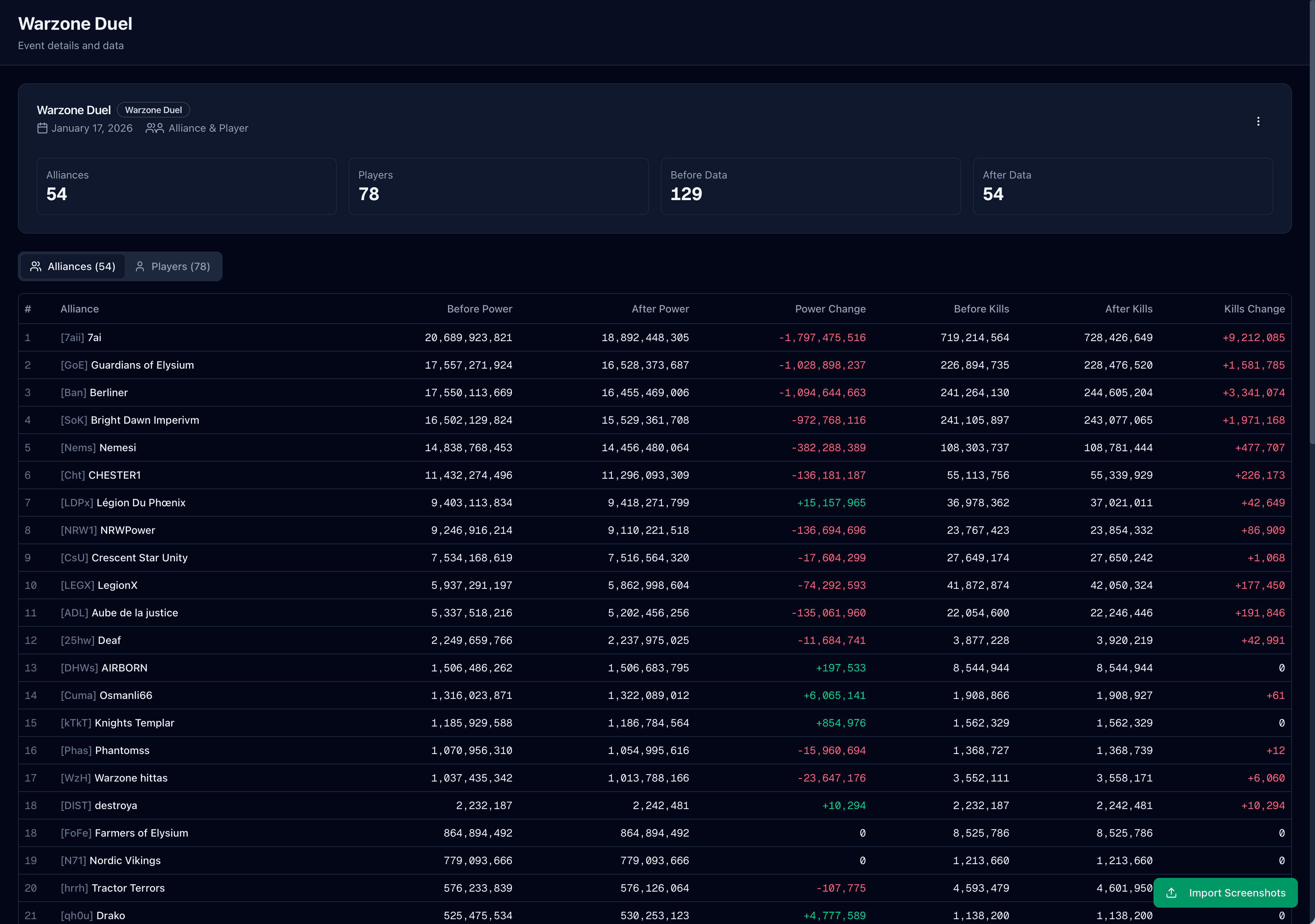
Track every alliance and every notable player on your server — power, kills, member count, ranking position, week-over-week movement.

/ 02

Season compare across 8 servers

See every server in your season side-by-side. Spot the heaviest, the deepest, and the most top-heavy — pick allies and avoid the wrong fights.

/ 03

Meteor War & Warzone Duel auto-sync

Schedule a meteor war or a warzone duel and FarmOps captures alliance and player power + kills before and after every fight — no screenshots, no manual exports. Compare your side slot-by-slot against the opposing server.

/ 04

Public ranking pages

Publish your server's rankings on a public URL. One link for the whole server instead of screenshots scattered across Discord.

/ 05

Duplicate-safe imports

Names shift, screenshots get noisy. FarmOps merges records and keeps your server database clean across resets.

/ 06

Diplomacy & scouting

Watch rival growth before the next warzone. Identify recruit-worthy independents before competitors do.

// SERVER #2847 · ALLIANCE RANKINGSSYNCED 02:14 UTC · AUTO
#ALLIANCEPOWERKILLSΔ7D
1Crimson Lords412M38M+2.1%
2Iron Phalanx389M31M+1.6%
3Stormborn356M28M+4.4%
4Apex Reign312M22M-0.8%
5Black Sun287M19M+0.4%
6Void Legion264M17M-1.2%
7Ashen Order242M14M+3.1%
8Nightwatch219M12M+0.2%
186
TRACKED ALLIANCES
4.2k
TRACKED PLAYERS
62.4B
TOTAL SERVER POWER
DAILY
AUTO SYNC
Overview
Alliances
Players
Compare
SEASON 3 · 8 SERVERS

Sizing up the field

How big each server is and how it stacks across power, kills, and depth.

THP / Power / Kills per server
Side-by-side across the three core metrics.
#1110
#1114
#1154
#1104
#1167
#1129
#1169
#1102
THPPowerKills
Top-alliance concentration
Tall top slice = single dominant alliance.
#1102
#1104
#1110
#1114
#1129
#1154
#1167
#1169
Top 1Top 2-3Top 4-10Rest
// SEASON COMPAREAll 8 servers in your season on one screen. Know who to ally with, who to avoid, and which servers are top-heavy versus deep.
/ 04Recently Added

Always Evolving
More every week.

We ship new features regularly based on your feedback. Here's what's new.

MAY 2026

Screenshot Upload

New Place / Assign / View / Map modes split the toolbar so each task has only the controls it needs.

NEW

Shield Miss Tracker

Catch unprotected members before storms hit. Per-member miss history, dashboard alerts, and incident logging.

NEW

Historical Power & Kills Import

Backfill weeks or months of player power and kill history with a single CSV. New alliances start with full context, not a blank slate.

NEW

Video Upload

Record your screen while scrolling through a list and upload the video. No more taking dozens of screenshots.

NEW

Alliance Seasons

Track seasonal fights with before and after power and kills. Measure your alliance's growth across events.

NEW

Performance Rankings

Automatic member scoring based on duels, donations, and storm participation. Customizable weights for your priorities.

NEW

Week Comparison

Compare VS scores between any two weeks. See who improved or declined with daily breakdowns, percentage changes, and color-coded highlights.

NEW

CSV Export

Export any table — duels, donations, events, or comparisons — as a CSV file. Use the data in spreadsheets or share it with your team.

NEW

Alliance Notes

A shared notepad for officers to store alliance announcements and mail templates. Write once, copy-paste anytime — no more retyping the same messages.

NEW

Undo Imports

Made a mistake? Revert any data import with a single click from the activity log. No data is ever lost.

NEW

Bulk Invite Links

Generate shareable invite links for your officers. Set expiration dates and usage limits for full control.

NEW

Quick Support

Built-in feedback and direct messaging system. Reach us instantly from within the app — no email required.

/ 05 Why leaders choose

Why Alliance Leaders Choose FarmOps
for the grind.

Built by players, for players. We understand the grind.

/ 01

Save Hours Every Week

Stop manually tracking spreadsheets. Our AI extracts data from screenshots in seconds, giving you back precious time to actually play the game.

/ 02

Ensure Fair Participation

Identify inactive members instantly. Track who's contributing to VS points, donations, and storms. Make informed decisions about your roster.

/ 03

Grow Your Alliance

Share your public stats page for recruitment. Show prospective members your alliance's strength and activity levels.

/ 04

Server-Wide Intelligence

Track rival alliances, monitor server power shifts, and plan your strategy with complete visibility across your entire server.

/ 06Three moves

How It Works
in under a minute.

STEP 01 // PREVIEW
NEW ALLIANCE
NAME
Stormborn
SERVER
#2847
R5 / OWNER
You
Drop screenshots here
OR PASTE · SHARE · RECORD
IMG_1024.png
IMG_1025.png
IMG_1026.png
IMG_1027.png
PARSING 4 / 4147 ROWS EXTRACTED
SEASON 3 // WEEK 4
+24%↑ vs S2
RECOMMEND
Promote PhoenixRise to R4
REVIEW
3 members under threshold
/ 07Built for teams

Officers have jobs.
Roles map to them.

Invite your officers and manage permissions with flexible roles.

R501

Owner

Full control over the alliance, billing, and all settings.

  • Full access
  • Billing
  • Transfer ownership
  • Delete alliance
R502

Manager

Full access including billing. Perfect for co-leaders.

  • Full access
  • Billing
  • Manage all data
  • Invite officers
R403

Admin

Manage officers and data. No billing access.

  • Manage members
  • Resolve conflicts
  • Upload data
  • No billing
R404

Officer

Upload data and view stats. Ideal for R4s.

  • Upload screenshots
  • View stats
  • Edit roster
  • No member mgmt
/ 08Upload anywhere

Zero Effort Upload

Multiple ways to get your screenshots in. Pick what works for you.

⌘V

Copy & Paste

Take a screenshot, paste directly into FarmOps. No file saving needed. Works on desktop and mobile.

Android Share

Use Android's share menu to send screenshots directly to FarmOps. One tap from your gallery.

Batch Upload

Upload up to 25 screenshots at once. Our AI processes them all in seconds, matching players and extracting data automatically.

Video Upload

Record your screen while scrolling through a list and upload the video. No more taking dozens of screenshots.

/ Quick support

Support for every topic

Ask from inside FarmOps and keep each request in one thread, whether it is a bug, setup question, import issue, or feature idea.

15m
Median first response time
94
Support threads answered
// WHAT LEADERS SAY
This tool has been incredibly useful for our alliance. It made tracking players and staying organized so much easier, especially as leadership. You can tell it was built by someone who actually understands the game and what alliances need to grow. Honestly, it's been a game changer for me and my team.
R4 · Bbl Alliance · Server #1154
This app is awesome! It's very helpful for tracking all members performance and improvements, and identifying where they need help and support. It was built by someone who is an expert on the game, and they continue to add things and improve it all the time. It's very helpful and makes managing members much easier.
ALMA91 · R4 · WD40 Alliance · Server #1152
This app is an absolute game-changer for anyone leading or co-leading an alliance in The Last War. It completely automates the tedious collection of server and alliance data and turns it into one clean, comprehensive dashboard showing real-time health, performance, and activity across the board. Instead of spending hours each day manually checking player activity, resource production, war stats, research progress, and alliance metrics, everything is right there in a single, accurate and easy-to-read view that is automatically collated. The insights are incredibly valuable for making fast, strategic decisions — whether it's identifying weak spots in our defense, spotting rising stars who need more support, or using as a planning tool for battles and events. As leadership, this tool has saved us countless hours every week. Tasks that used to eat up entire evenings are now done in minutes, freeing us up to focus on actual strategy and player engagement instead of data entry. The built-in coaching nuggets are a fantastic bonus too — quick tips and analysis that help us mentor newer members more effectively and strengthen the entire alliance. If you're serious about taking your alliance to the top in The Last War, this app is essential. It doesn't just show you the numbers — it gives you the power to lead smarter. Highly recommended! 🚀
GOLDILOCKS · R5 · SAF Alliance · Server #1152
/ 09Pricing

Simple, Transparent Pricing

Start free, upgrade when you're ready.

// FREE TRIAL

Free Trial

Try everything free for 7 days

$0/ 7 days
No credit card required
  • Up to 3 team members
  • 5 screenshots per upload
  • AI-powered data extraction
  • VS point & duel tracking
  • Donation monitoring
  • Storm participation tracking
  • Custom events
  • Season tracking
  • Activity log
  • Duplicate player detection
  • Video upload support
// ALLIANCE PROMOST PICKED

Alliance Pro

For serious alliance leaders

$14.99/ month
Cancel any time
  • Everything in Free Trial
  • Unlimited team members
  • 25 screenshots per upload
  • Custom public subdomain
  • Shareable invite links
  • Priority support
// ADD-ON

Auto Sync

$14.99/ month

Daily roster sync plus Live Sync inside custom events. Pulls each member's power, kills, HQ level, profession, and profession level automatically — no screenshots required.

Requires active Alliance Pro subscription
// SERVER TRACKER

Server Tracker

$19.99/ mo, per server

Track a whole game server. Alliance + player rankings, power, kills, public ranking page — daily auto sync included, no extra add-on needed.

Daily auto sync included
/ 10FAQ

Frequently Asked Questions

01How does the AI screenshot parsing work?
FarmOps uses AI-powered OCR to read player names and scores from your Last War screenshots. You upload one or more screenshots — or a screen recording video — and the AI extracts all visible data automatically. It matches player names against your alliance roster, handling typos, special characters, and name changes. If a name cannot be matched, it gets flagged for manual review so nothing is lost. The system improves its accuracy over time as it learns your alliance's player names. You can upload up to 25 screenshots at once, and video uploads are supported for scrolling through long member lists. The entire process takes seconds per screenshot, replacing what would otherwise be 30-60 minutes of manual data entry after each game reset.
02What game data can I track?
FarmOps tracks VS points (daily duel scores), donations, Canyon Storm and Desert Storm participation, power levels, kill counts, and alliance seasons. Each data type has its own dashboard with filters, thresholds, and week-over-week comparison views. You can also create custom events to track anything the built-in categories do not cover, like warzone performance, arena rankings, or special alliance challenges. Server tracking adds alliance-level and player-level rankings across your entire game server. The hive planner lets you map base positions visually. All data connects to the same member roster, so an officer can see a member's VS performance, donation history, storm reliability, and season stats in one place.
03Can multiple officers upload data?
Yes. Alliance Pro supports unlimited team members with role-based permissions. You invite officers via shareable links, and each role — Owner, Manager, Admin, Officer — controls what that person can do. Officers can upload screenshots and view stats. Admins can also manage team members and resolve data conflicts. Managers have full access including billing and settings. All imports, edits, and follow-up actions are logged in a shared activity timeline, so every officer can see who uploaded what and when. This means leadership work does not disappear when one officer goes offline — the next person can pick up exactly where they left off.
04How do I upload screenshots on mobile?
FarmOps is designed for mobile uploads since most Last War players take screenshots on their phone. On Android, you can share screenshots directly to FarmOps from your gallery or screenshot notification using the system share menu. On iOS, copy the screenshot and paste it into the FarmOps upload area. You can also install FarmOps as a Progressive Web App (PWA) from your browser for quick home screen access — it works like a native app without needing an app store download. Batch uploads are supported, so you can select up to 25 screenshots at once. Video uploads are also available if you prefer to screen-record while scrolling through a long member list.
05What happens after my trial ends?
After your 7-day free trial, your alliance data is preserved in read-only mode. You can still view all previously imported data, but you will not be able to upload new screenshots or access features that require an active subscription. No data is deleted. You can upgrade to Alliance Pro at any time during or after your trial to restore full access. Alliance Pro costs $14.99 per month or $149 per year (two months free on the annual plan). The subscription covers unlimited officers, all tracking features, public alliance pages, custom events, the AI data assistant, and CSV exports. There is no per-member fee — the price is the same whether your alliance has 10 or 100 members. Alliance Pro can be extended with the optional Auto Sync add-on ($14.99/month) that pulls each member's power, kills, HQ level, profession, and profession level automatically every day and on-demand inside custom events — no screenshots required.
06Can I share my alliance stats publicly?
Yes. Alliance Pro subscribers can publish a public stats page at a custom subdomain — for example, youralliance.lastwar.farm. You choose exactly which metrics are visible: member counts, VS participation rates, donation progress, storm reliability, or any combination. The public page updates automatically as you import new data, so it always reflects your latest numbers. Many alliances use their public page as a recruiting tool — sharing the link in Discord servers and game chat to show prospective members that the alliance is active, organized, and tracks performance consistently. You can enable or disable the public page at any time from your alliance settings.
07Is my data secure?
Yes. FarmOps takes data security seriously. Screenshots are processed by the AI engine and the extracted data is stored in an encrypted database. The original screenshot files are not retained after processing. All connections use HTTPS encryption. Your alliance data is only accessible to team members you have explicitly invited — no one outside your officer team can see your dashboard. Payment processing is handled by Paddle, a PCI-compliant payment provider, so FarmOps never stores your credit card details. The service is hosted on Vercel and uses Neon for database storage, both of which maintain SOC 2 compliance. You can delete your account and all associated data at any time.
08Can I leave the alliance, transfer ownership, or delete my account?
All three are self-service — no support ticket needed. From your alliance settings, an owner can transfer ownership to another officer; billing transfers cleanly with a cancel-at-period-end handoff so neither side gets double-charged. Any officer can leave an alliance or server they no longer belong to in one click; their historical contributions stay attached to the roster under a former-member status. Account deletion lives in /settings — it removes your login and personal data. The only guardrail: you cannot delete an account while you are the sole owner of an active alliance, so an alliance is never orphaned. Cancel any time, leave any time, take your data with you.
READY // STATUS GREEN

Ready to Level Up Your Alliance?

Join hundreds of alliance leaders who trust FarmOps.